


ClassiPod
3.991.00 Reviews
App Specs
- Version
- 1.12.0
- Updated On
- License
- Free
- Downloads
- 100,000+
- Developer
- Adeeteya
- Categories
- Music & Audio
- Platform
- Android
Screenshots
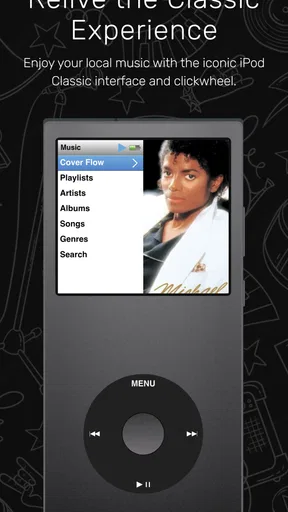
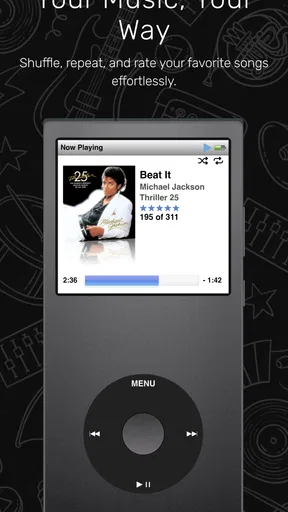
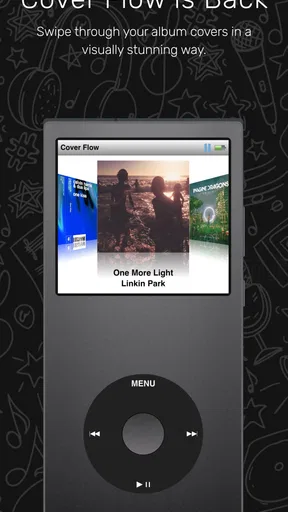
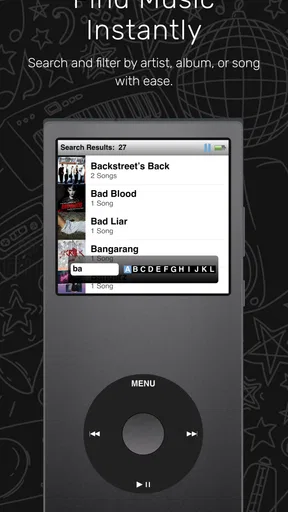
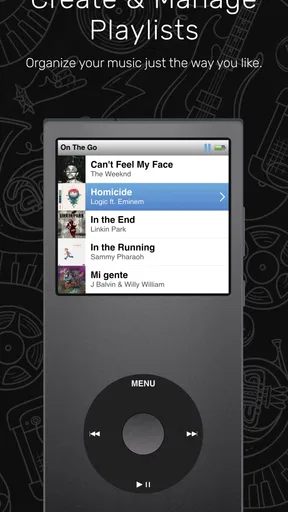
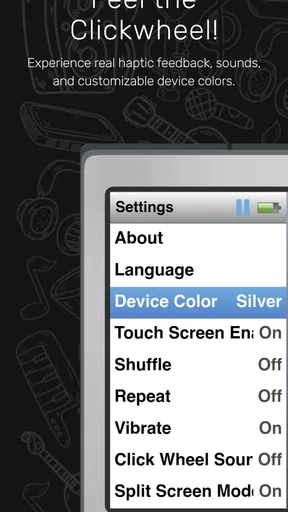
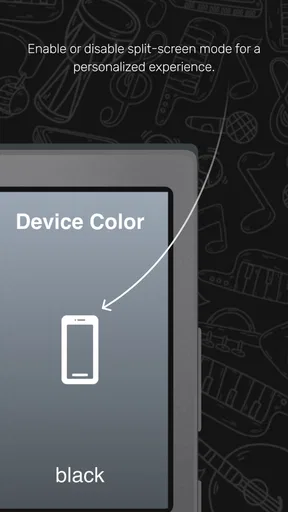
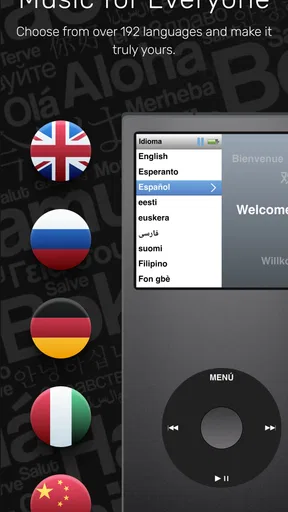
 Analysis by AppCompare
I approached ClassiPod as a practical question rather than a nostalgia exercise: can a small local music player make listening easier when I already have music on my device? After spending time with it, my answer is yes, provided you want a focused player instead of a complete streaming service. This free Music & Audio app from Adeeteya is built around the feel of the iPod Classic, and that choice affects almost every part of the experience, from the way I browse a library to the amount of attention the interface demands.
The app is aimed at people who keep audio files locally and want to play them without opening a streaming platform. It is available for Everyone, works on Android 7.0 and later, and has reached over 100 thousand installs. Its current version is 1.12.0, while the app itself was released on March 26, 2025. Those details make it accessible to a wide range of Android users, including people with older phones, but the real decision is more personal: do you enjoy browsing music as a collection, or do you mainly want an instant search box and automatic recommendations?
What I looked for before recommending it
My first decision criterion was library control. A local player should make the music already stored on a phone feel organized, not turn the process into another subscription or account-management task. I wanted to see whether ClassiPod could make albums, artists, songs, and playlists feel like parts of one coherent collection. The iPod-inspired approach is important here because it encourages browsing rather than treating every track as an isolated search result.
The second criterion was everyday speed. A player can look charming and still become irritating if I need too many taps to start an album, return to a queue, or resume something I paused earlier. I paid attention to the small moments that matter when I am walking, cooking, commuting, or putting my phone away: how quickly I can reach a familiar record, whether the current song remains easy to control, and whether the interface feels understandable without a tutorial.
I also considered whether the design helps or gets in the way. Recreating the spirit of an older music player can be satisfying, but nostalgia is not automatically good usability. A compact, tactile-feeling layout may encourage deliberate browsing, while a modern streaming app usually prioritizes discovery, search, and visual recommendations. ClassiPod therefore needs to be judged as a focused local-library tool, not as a replacement for every kind of music app.
Finally, I considered the switching cost. If your music is already stored neatly on your phone, trying a local player is relatively simple. If your listening habits depend on cloud libraries, personalized mixes, synchronized playlists, or recommendations, moving to a local-first workflow requires more preparation. That difference matters more than the appearance of the player itself.
The iPod idea works best when I browse deliberately
The strongest part of the experience is the sense that music is something I can browse as a personal collection. Instead of being pushed toward whatever a service wants me to hear next, I can approach my library with an album or artist in mind. That makes ClassiPod especially pleasant for listeners who still think in terms of records, saved albums, and carefully chosen playlists.
Worth Reading Before You Choose

Flipboard Shows What News Apps Must Do Beyond the Feed

Switching to Android Auto Means Rethinking Your Driving Routine

Google Calendar Makes a Crowded Week Easier to Manage

Ludo King Makes the Most of the Minutes Between Plans

Baby Panda World Brings Quick Play to Modern Phones, but Its Game Library Feels Busy

ESPN’s Live Game View Makes Following Close Games Easier
This is also where the app feels more specific than a generic offline player. The iPod Classic influence gives the interface a clear personality. I am not simply opening a file list; I am navigating a music collection with a more intentional rhythm. That can make a familiar album feel more inviting, especially when I want to listen from beginning to end rather than jump between unrelated recommendations.
There is a useful psychological benefit to this design. Streaming services are excellent at removing friction from discovery, but they can also make my own collection feel temporary and interchangeable. A local player creates a stronger boundary around the music I have chosen to keep. ClassiPod reinforces that feeling by making the library the center of the experience rather than an afterthought below online content.
For an everyday example, imagine that I am leaving home with a few albums already saved on my phone. I do not want to browse new releases, check an account, or decide what an algorithm thinks fits my mood. I open the player, move through my collection, choose the album I had in mind, and let it run. That is a modest use case, but it is exactly the kind of moment where a focused app can feel better than a much larger service.
Local listening changes how I prepare
The main trade-off is that the app depends on the quality of my local library. ClassiPod can make existing files easier to enjoy, but it does not remove the work of acquiring, transferring, naming, and organizing those files. If my music folder is chaotic, with inconsistent artist names or incomplete album information, the browsing experience may feel less polished than the design suggests.
I found that the best workflow is to treat library preparation as part of the listening setup. Before relying on the app for a trip, I would check that the albums I want are actually on the device, that their information is readable, and that I have tested the player with the folders or files I use most. This is one of the less obvious lessons of choosing a local player: the app may be simple, but the quality of the underlying collection determines how effortless it feels.
That preparation can still be worthwhile. Once my files are in place, I am less dependent on a connection and less likely to lose time searching across a huge online catalog. I also get a listening environment that is centered on ownership and selection rather than endless browsing. For people with a stable offline collection, this is a meaningful strength rather than a minor convenience.
Where this app wins against the usual choices
ClassiPod wins when the alternative is a cluttered general-purpose player that technically plays local files but gives them no sense of place. Its defining advantage is focus. The app is not trying to be a podcast hub, a radio station, a social feed, and a recommendation engine at the same time. That makes it easier for me to understand what it is for as soon as I open it.
It also has an advantage over streaming apps for listeners who want to avoid mixing personal files with online catalogs. A streaming service is usually better at finding something new, but it can make a locally stored album feel like an exception. Here, the local collection is the main event. That distinction is valuable for people who have built a library over time and want to listen to it without distractions.
The nostalgic design is not merely decoration. It changes the pace of interaction. I am encouraged to move through the collection and make a choice, rather than repeatedly opening a search field because the home screen is dominated by suggestions. For some listeners, that slower and more deliberate approach is a feature. It can make an album listen feel like a decision instead of background content selected at random.
Another practical win is the entry cost. ClassiPod is free, so I can test whether its local-player approach fits my habits without paying before I understand the workflow. Its Everyone content rating also makes it an uncomplicated option for general household use. I would still judge it by how well it handles my own library, but there is little financial risk in giving the concept a fair trial.
Small habits that make the experience better
My first tip is to begin with a small, familiar section of the library rather than transferring everything and judging the app from a crowded collection. I would start with a few albums I know well, because that quickly reveals whether the browsing style suits me. It also makes it easier to notice problems in organization before they become frustrating across the whole library.
My second tip is to use the app for complete listening sessions, not only for one-off tracks. The iPod-inspired approach makes more sense when I choose an album, artist, or prepared playlist and let the session develop. If I mostly search for a single song and immediately close the player, I may not experience the main reason to choose this design over a basic file player.
A third useful insight is to separate discovery from playback. I would use a streaming service, a web browser, or recommendations elsewhere when I want to find unfamiliar music, then place the albums I genuinely want to keep into my local collection. ClassiPod can then serve as the calm, focused destination for repeat listening. This two-part workflow avoids asking one app to be both an exploration engine and a personal archive.
I would also test the player before a long journey rather than assuming that a local setup is automatically ready. Start the albums you expect to hear, check that the library is easy to navigate, and confirm that your preferred listening order feels natural. This is not a criticism unique to ClassiPod; it is simply the cost of choosing local playback. The advantage is reliability once the preparation is done, but the preparation should not be skipped.
When a different category is a better match
I would not choose ClassiPod as my main music app if my priority is discovering new artists every day. Streaming services are generally better suited to recommendations, curated collections, online search, and constantly changing catalogs. They remove the need to manage files and make it easier to move between familiar and unfamiliar music. ClassiPod is more appropriate after I have already decided what I want to keep locally.
I would also look elsewhere if my listening life depends on a cloud-based library that follows me across several devices. A local player is naturally tied to the files available on the device where I use it. If I expect seamless synchronization, shared queues, or a single account-based collection across platforms, the usual streaming or cloud-library category will probably involve less manual work.
There is another possible mismatch for people who want extensive audio management rather than a focused listening interface. Users who need elaborate tagging tools, unusual file-handling controls, or specialist playback adjustments may prefer a more technical local player. ClassiPod’s appeal is its approachable, themed experience, so I would not select it solely because I want the largest possible toolbox.
Likewise, listeners who mainly consume spoken audio may find its identity less relevant. The app is designed around the feeling of a classic music player, and that makes most sense when albums, artists, songs, and personal music collections are central to the way I listen. A podcast-focused application may be a better fit for episode queues, subscriptions, and spoken-word discovery.
The real cost of changing from a streaming habit
Because ClassiPod is free, the biggest cost of switching is not money. It is time and attention. I need to decide which files belong on my phone, organize them well enough to browse, and accept that discovery may happen outside the app. For someone with a ready local collection, that cost is small. For someone who has never managed music files, it may be the part that determines whether the app feels liberating or inconvenient.
I would make the change gradually. Keep the current streaming service for discovery, move a few dependable albums into local storage, and use ClassiPod during the situations where concentrated listening matters most. A commute, an offline trip, or an evening with one favorite record can reveal more than a quick five-minute test. If those sessions feel calmer and easier, expanding the local library makes sense.
The switch also changes how I think about storage. A local music collection occupies device space, and the benefit of having music immediately available depends on planning that space sensibly. I would prioritize albums I replay often rather than trying to mirror every possible listening choice. That approach keeps the library purposeful and makes the app’s browsing experience more manageable.
There is a welcome upside to this deliberate approach: fewer decisions while listening. Once I have selected the music I actually want available, I am not constantly comparing recommendations or wondering whether the next track is part of a temporary online catalog. The trade-off is less variety on demand, but for focused repeat listening, that can be exactly the point.
How the current release fits its audience
The current version is 1.12.0, and the app has attracted an average rating of 3.9 from around 974 ratings, alongside 91 written reviews. I read that overall response as interest with some reservation, which feels consistent with a deliberately specialized concept: people who want an iPod-like local player may appreciate the direction, while users expecting a full modern streaming replacement may judge it by the wrong standard.
The developer, Adeeteya, has positioned the app around a recognizable idea rather than an overloaded feature list. That clarity helps me decide quickly whether to try it. It is not presented as the answer to every audio need; it is a local music player designed to capture the essence of the iPod Classic. In practical terms, that means the app’s success depends on whether the design philosophy matches my habits.
Compatibility with Android 7.0 and later is another reason it can appeal to people using older devices. I would still test it on the phone I intend to use, particularly if my library is large or my files are arranged in an unusual way, but the broad minimum system requirement makes the app approachable beyond only recent hardware.
My recommendation after using it
I recommend ClassiPod to Android listeners who already keep music locally and want a more characterful way to browse it. I especially like the fit for album listeners, people who enjoy the iPod Classic style, and anyone who wants playback separated from streaming recommendations. The free price makes experimentation easy, and the focused design gives the app a clear reason to exist.
I would skip it as a primary player if I need cloud synchronization, constant discovery, or a service that supplies the music as part of the same experience. In those cases, a conventional streaming app will probably save time and offer a broader catalog-driven workflow. I would also avoid switching abruptly if my local files are disorganized; first preparing a small, reliable collection will produce a fairer test.
For me, the most convincing way to use it is as a dedicated personal shelf: keep the albums I care about on the phone, open the player when I want intentional listening, and use other tools only when I am searching for something new. ClassiPod is at its best when simplicity means fewer distractions, not fewer possibilities. If that sounds like the kind of listening routine you want, it is worth trying; if you want an all-in-one music ecosystem, the familiar alternatives remain the better choice.
Pros
- Simple interface makes browsing classic music easy.
- Lightweight design uses little storage and system resources.
- Quick access to playlists and favorite tracks.
- Suitable for listeners who prefer a nostalgic music experience.
- Works well for short listening sessions on mobile devices.
Cons
- Music availability may vary by region or licensing rights.
- The catalog may feel limited compared with major streaming services.
- Some features may require an internet connection.
- Limited customization for advanced music library management.
- Older devices may experience occasional playback or loading issues.
FAQs for ClassiPod
What is ClassiPod and what can I use it for?
ClassiPod is an app designed for users who want to discover, organize, and enjoy classically oriented audio content in a convenient mobile format. Depending on the available catalog and app version, it may help you browse recordings, search for specific works or performers, and create a more personalized listening experience. Before downloading, check the store description to confirm the exact content and supported features in your region.
Is ClassiPod free to download and use?
ClassiPod may be available as a free download, but some features, content, or listening options can depend on the developer’s current business model. The app may include advertising, optional purchases, or subscription-based access, so it is worth reviewing the pricing information shown on Google Play or the App Store before installing. Always check renewal terms if a subscription is offered.
Does ClassiPod work without an internet connection?
Offline listening depends on the features provided by the current version of ClassiPod. Some audio applications allow users to save selected content for later playback, while others require an active internet connection whenever content is streamed. If offline access is important to you, review the app listing and its settings after installation, and remember that downloaded files may require periodic account or license verification.
Which devices and operating systems are compatible with ClassiPod?
ClassiPod is intended for mobile devices, but compatibility can vary between Android and iOS versions, screen sizes, and hardware capabilities. Older phones or tablets may experience limitations, especially when handling streaming, background playback, or newer security requirements. Before downloading, compare your device’s operating system version with the minimum requirements shown on the official store page to avoid installation or performance problems.
Is ClassiPod safe to install and does it protect my privacy?
ClassiPod should be downloaded from the official Google Play Store or Apple App Store rather than from unofficial websites, where modified files may present security risks. During setup, review the permissions requested and provide only those that seem necessary for the app’s features. You should also read the developer’s privacy policy to understand how listening activity, account details, device information, and analytics data may be collected or shared.


